
CropSort Analytics
Login
No data storage. We don't keep your label or P&L Files. Ever.

Free Meesho Label Crop Tool – Crop, Sort & Organize Shipping Labels Instantly

Automatically Crop and Sort Meesho shipping labels from PDF files, group them by SKU, and Split them by courier or supplier Account. Designed for Meesho sellers having multiple Supplier Accounts and handling bulk orders.

Crop & Sort Meesho labels PDF automatically Create Separate PDFs for Multi-Quantity, High orders SKU, Courier, or Supplier Account Generate print-ready files instantly No data stored – 100% secure

Used by Meesho sellers to save hours of manual work daily

Trusted by growing Meesho sellers for daily bulk label processing

Problems with other tools and Manual Meesho Label Sorting

Most Meesho sellers struggle with manually separating shipping labels of each item from printed labels. When order volume increases, this process becomes slow, repetitive, and highly error-prone.

Without a proper Meesho label crop tool, scaling operations becomes difficult, inefficient & need extra manpower.

How CropSort Saves Time for Meesho Sellers

This Meesho label crop tool is designed to reduce manual work by up to 90%. What used to take hours can now be completed in minutes.

Upload & Process Your Meesho Labels

MeeshoMeesho Label Crop/Sort/Split

Organize Meesho shipping labels and save time

or
📁

Create separate PDF files for easy Printing & Pasting labels

Splitting PDFs Options

Separate Supplier Account Wise
Delhivery
Shadowfax
Xpress Bees
Valmo
Separate High Order SKU/Group?
Delhivery
Shadowfax
Xpress Bees
Valmo

(SKU/Group with quantities more than Threshold entered above will be put in separate file for easy Printing & Pasting)

Quick Access:

Bulk generate SKU_Grouping File

How It Works

1

Upload PDFs

Upload all Meesho shipping label files of all supplier accounts.

2

Generate SKU Grouping File

To separate high order SKUs, Generate SKU Grouping File. Use existing SKU Grouping file, if any.

3

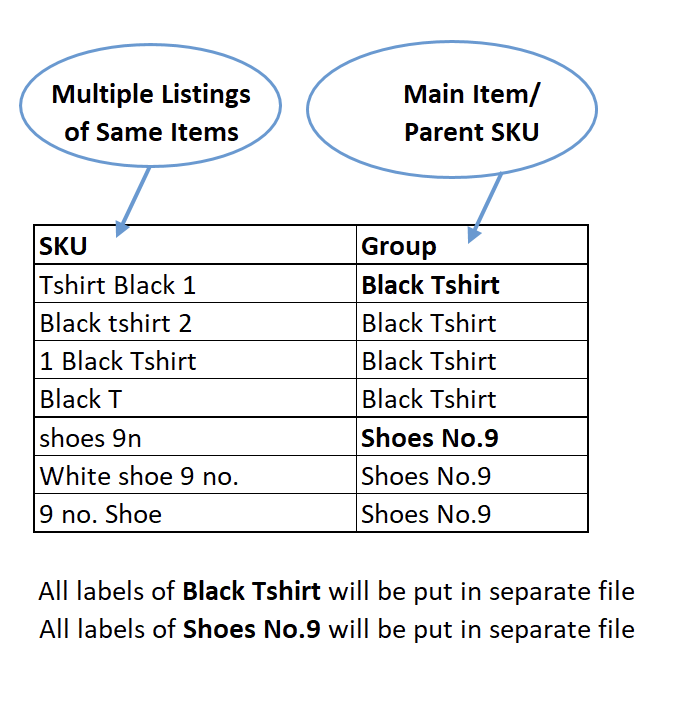
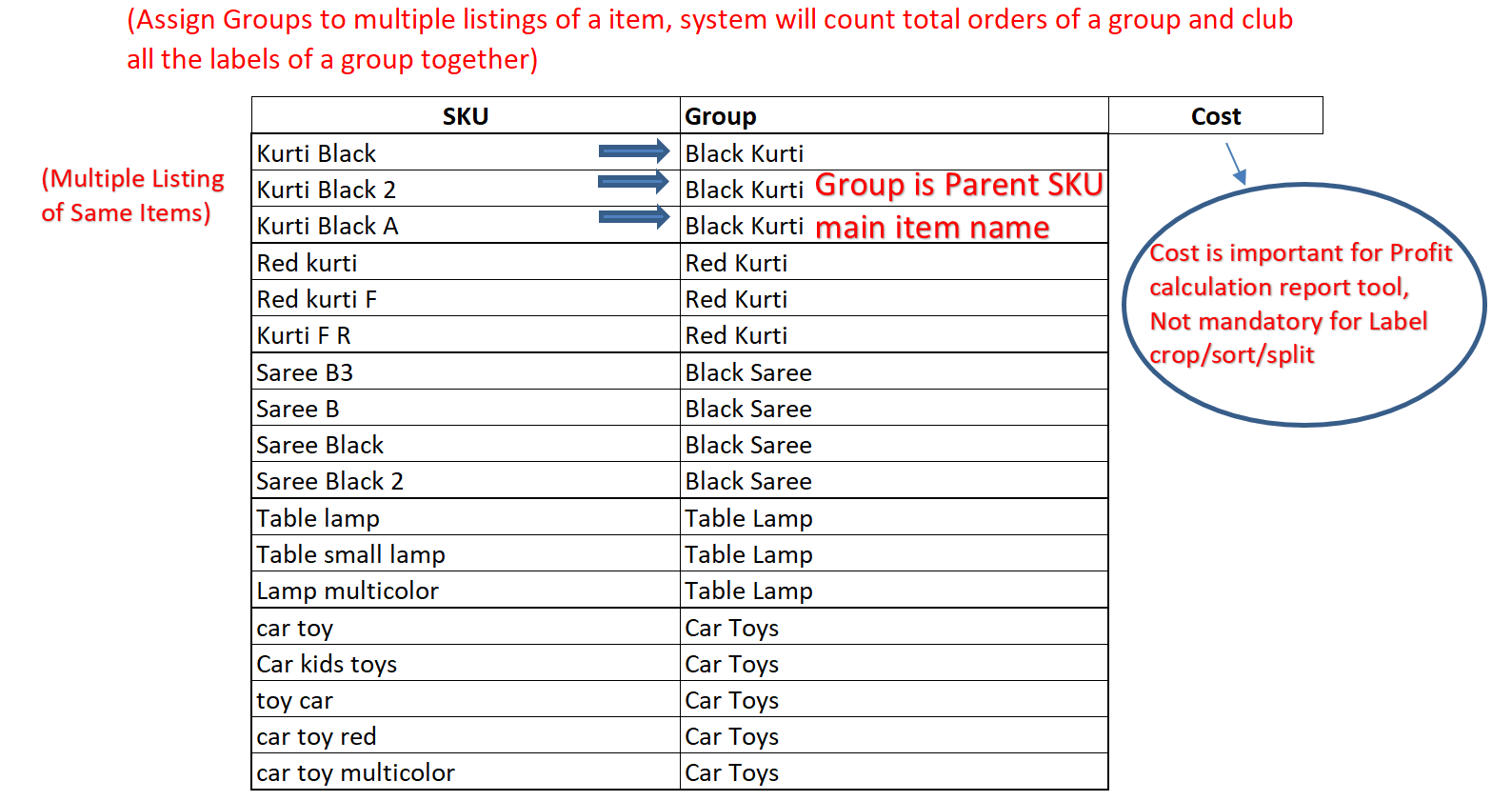
Assign SKU Groups/Parent SKU

If you have multiple listings of same item, assign group to those SKUs in the Excel file and upload the file. All the listings under a group will be put together irrespective of different SKUs on the label or supplier account.

4

Upload Grouping File and choose splitting options

Labels of all the supplier accounts are merged and courier wise different file is generated for easy printing. If you want to further separate supplier account wise or SKU wise click toggle and chose a limit (if any sku group has labels more than limit, its file will be created separately))

5

Click CropSort Labels

Instantly crop, sort, and generate organized output files ready for printing. Multi-Quantity labels are always put in a separate file to avoid mistakes. A combined order list(Manifest) will also be created to know total SKU wise order of all supplier accounts.

💡

Pro Tip

Use a single SKU_Grouping file across Flipkart and Meesho for all label and profit calculation tools.
Download Bulk Inventory Update File

Flipkart: Inventory > Seller Inventory Insight > All Inventory > Bulk Stock Update > Download Bulk Stock File

Meesho: Go to Inventory > Click Bulk Stock Update (below Catalog Upload button in top right side)

Upload these files directly to Generate complete SKU_Grouping File

Working on it. Please Wait

Processing your labels...

What is the Meesho Label Crop Tool?

The Meesho Label Crop Tool is a free online tool that helps sellers crop Meesho shipping labels from PDF files and organize them automatically. It extracts SKU data from labels, groups them, and generates sorted output files for fast printing and packing.

This meesho shipping label tool eliminates manual sorting, Separating by hand, making it ideal for sellers handling bulk orders daily.

Why Use This Meesho Label Crop Tool?

How to Crop Meesho Labels PDF (Step-by-Step)

  1. Upload Label PDFs – Upload all Meesho shipping label files
  2. Generate SKU Grouping File – Extract SKU data automatically
  3. Assign SKU Groups – Categorize SKUs in the downloaded Excel file
  4. Upload Grouping File – Upload the updated file back
  5. Click CropSort – The tool will crop, sort, and generate organized files according to you settings

Advanced Features

Best Tool to Crop Meesho Labels PDF

If you are searching for a meesho label crop tool, CropSort provides one of the fastest and most accurate ways to crop Meesho labels PDF files. It also acts as a meesho label sorter by organizing labels into structured output files ready for printing.

This makes it an essential meesho shipping label tool for sellers who want to improve packing speed and reduce dispatch errors.

Who Should Use This Tool?

This Meesho label crop tool works as a complete Meesho label sorter by automatically organizing labels into structured outputs. Whether you need to crop Meesho labels PDF or manage bulk shipping labels, this tool provides an efficient and scalable solution.

Learn more in our guide: How to Crop Meesho Labels

If you are looking for the best Meesho label crop tool, this solution helps you crop Meesho labels PDF, organize them efficiently, and use it as a powerful Meesho label sorter and Meesho shipping label tool for bulk order processing.

Frequently Asked Questions

How to crop Meesho labels from PDF?

Upload your Meesho shipping label PDF, generate the SKU grouping file, assign groups in the Excel file, upload it back, and click CropSort. The tool will automatically crop and sort all labels by SKU and courier.

Is this Meesho label crop tool free?

Yes, the Meesho Label Crop Tool is completely free. There are no hidden charges or subscription fees. You can process as many labels as you need.

Does this tool store my data?

No, your files are not stored. All processing is secure and temporary. We do not keep any label data, PDFs, or personal information on our servers.

Can I sort Meesho labels by courier?

Yes, labels can be separated courier-wise for Delhivery, Shadowfax, XpressBees, and Valmo. You can also configure separate files for each supplier account.

What file format does this tool support?

The tool accepts PDF files for shipping labels and Excel (.xlsx, .xls) or CSV files for SKU grouping. The output is a ZIP file containing sorted, cropped PDFs and a manifest Excel file.