Problems with Manual Flipkart Label Sorting
Most Flipkart sellers manually read and separate labels from single pdf file before Pasting labels. As
order volume increases, this process becomes slow, repetitive, and error-prone.
- Need to read each label to identify SKU
- Mixing of SKUs during label pasting causing wrong dispatch and increase Customer Returns.
- Existing tools sort alphabetically and No automatic grouping for multiple listings of same items
- Multi-quantity and multi-SKU orders create confusion, chances of mistake increases
- High order SKUs slow down packing process
- No proper Flipkart label crop or sort tool available
Without a proper Flipkart label crop tool, scaling dispatch becomes difficult and requires more manpower.
How This Flipkart Label Crop Tool by CropSort Saves Time
This free Flipkart label crop tool automates the entire process of cropping, grouping, and organizing
labels.
- Automatically crop Flipkart labels from PDF
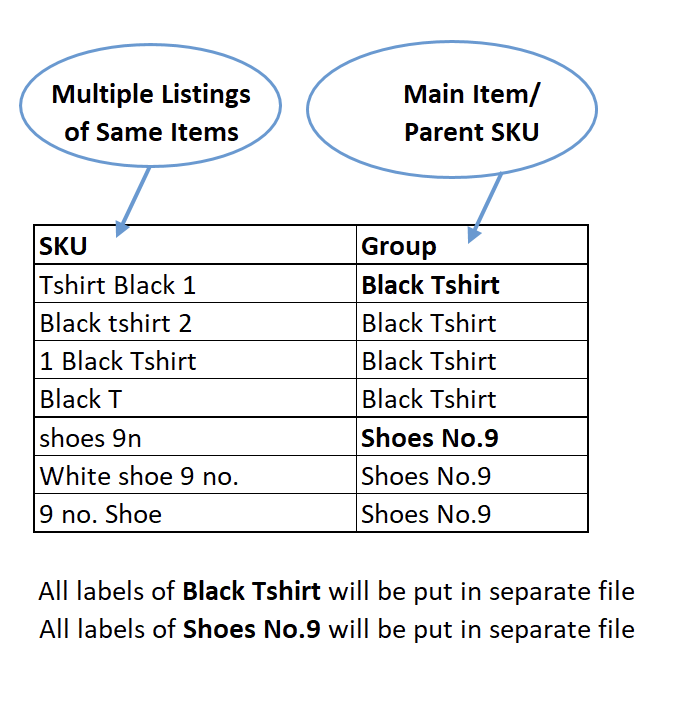
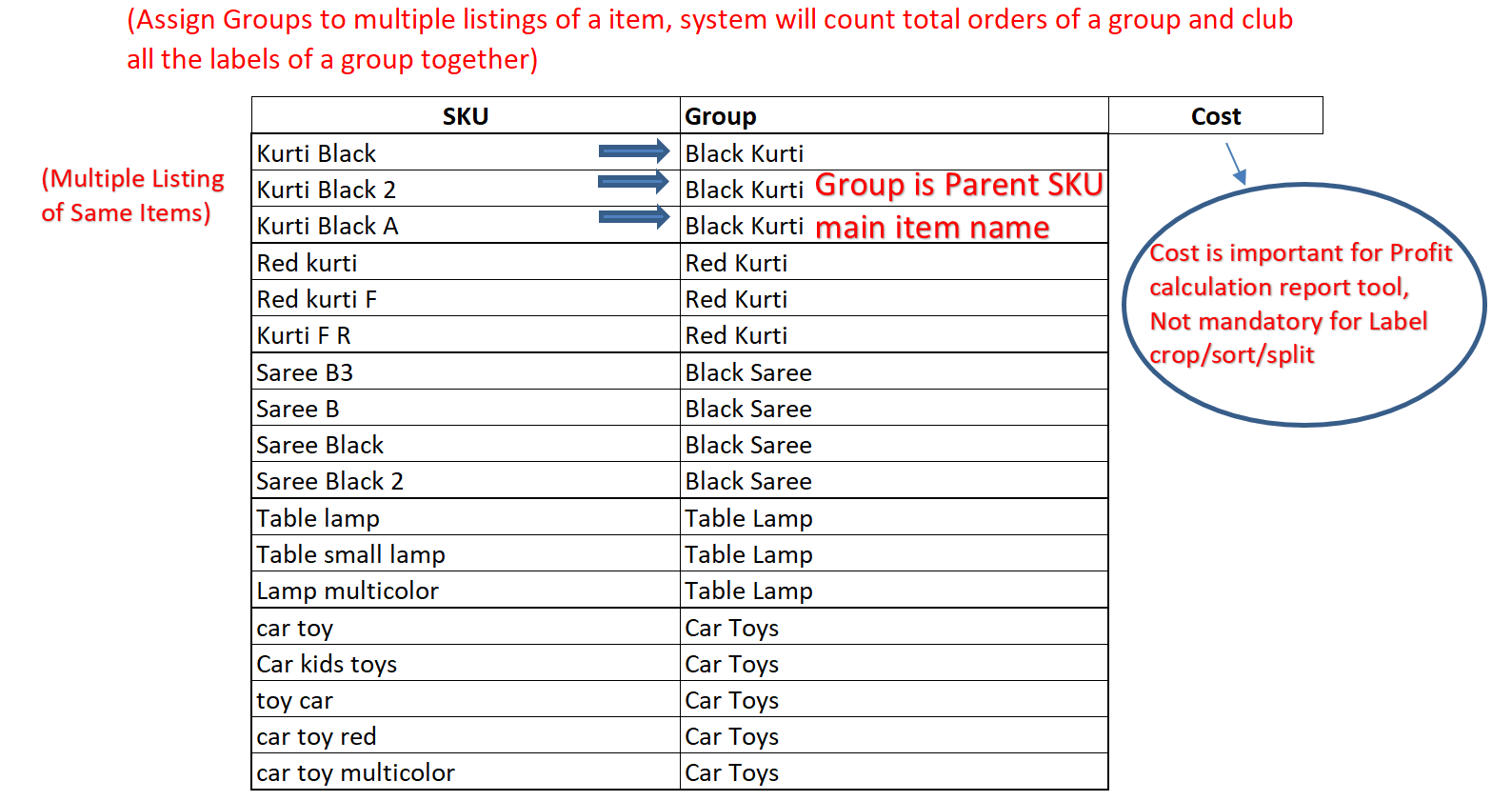
- Group multiple listings of same item using SKU grouping file
- Split high order SKU groups into separate files
- Separate multi-quantity and multi-SKU labels from single quantity to avoid mistakes
- Handle MOQ logic (quantity = 2) intelligently
- Generate Parent SKU-wise order list for packing
Reduce manual work by up to 90% and eliminate wrong dispatch completely.
Unlike basic label sorters that arrange labels alphabetically, this tool groups labels based on actual
product mapping using SKU grouping.
This tool works as a complete Flipkart label crop tool and label sorter. If you are
searching for flipkart label crop, flipkart label sort, label cropper, or shipping label automation tool,
this solution helps you process bulk labels in seconds and generate organized print-ready files. This tool
is ideal for anyone looking to crop shipping labels PDF and automatically sort them without manual effort.
What is Flipkart Label Crop Tool?
The Flipkart Label Crop Tool is a free online tool that helps
sellers crop Flipkart shipping labels from PDF files and organize them automatically. It extracts SKU
information, groups similar items, and generates sorted output files for fast printing, packing and pasting
labels.
Also check our Meesho Label Crop Tool if you
handle multiple supplier accounts and need combined label processing.
Why Use CropSort's Flipkart Label Crop Tool?
- Crop Flipkart labels PDF automatically
- Sort labels Parent SKU-wise not alphabetically
- Reduce packing errors and save time
- Handle bulk orders efficiently
- Generate organized files for easy label pasting
This tool is also useful for users searching how to crop
shipping labels PDF and organize them automatically.
How to Crop Flipkart Labels PDF
- Upload Flipkart label PDFs
- Generate SKU grouping file
- Assign groups to similar SKUs
- Upload grouping file
- Click CropSort to generate sorted labels
Best Flipkart Label Sorter Tool
If you are looking for a Flipkart label sorter or label
cropper, CropSort provides one of the fastest and most accurate ways to process shipping labels. It
automates SKU grouping, sorting, and file separation to make packing faster and error-free.
Learn complete step-by-step guide on how to crop shipping labels
PDF using our detailed tutorial.
Who Should Use This Tool?
- Flipkart sellers handling bulk orders
- Sellers having multiple listings of same items
- Sellers managing multiple SKUs
- Businesses looking to automate label processing
Frequently Asked Questions
Can I crop and sort
Flipkart labels automatically?
Yes, this tool automatically crops Flipkart labels and
sorts them SKU-wise without manual reading.